CINETON Studio
Camera Overlay — Viewfinder HUD for DaVinci Resolve
Camera Overlay — Viewfinder HUD for DaVinci Resolve
Couldn't load pickup availability
Camera Overlay for DaVinci Resolve
Transform your footage into real camera material.
Get the look of a raw camera feed directly in DaVinci Resolve. Simply drag the overlay onto your clip – and your image will instantly be framed in your camera's viewfinder, including all typical HUD elements:
✓ FPS
✓ Shutter
✓ ISO
✓ White Balance
✓ Focal Length
✓ Camera Name
✓ Flashing REC Indicator
✓ Running Timecode
Perfect for social content, music videos, commercials, behind-the-scenes footage, or any edit that should appear more authentic and cinematic.
For every format. For every camera.
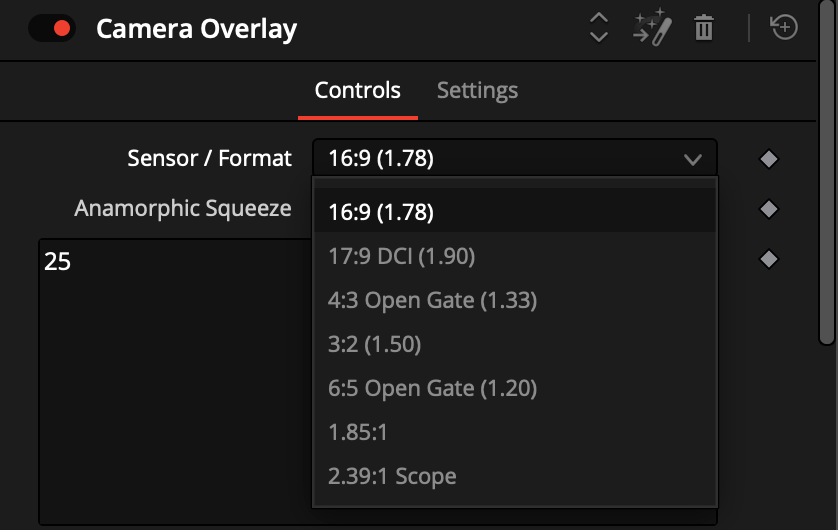
Whether classic 16:9, DCI, Open Gate, or CinemaScope – the overlay automatically adapts to your material.
Supported formats:
- 16:9
- 17:9 DCI
- 4:3 Open Gate
- 3:2
- 6:5
- 1.85:1
- 2.39:1 Scope
Shooting anamorphic? No problem.
Supported Anamorphic Squeeze Factors:
- 1.0x
- 1.25x
- 1.3x
- 1.33x
- 1.5x
- 1.6x
- 1.8x
- 2.0x
The overlay automatically recalculates the viewfinder, shifts the HUD area accordingly, and ensures that your image remains correctly framed at all times.
Full control directly in the Inspector
No Fusion knowledge necessary.
All values can be easily adjusted via the Inspector:
- Change camera name
- Set FPS and Shutter
- Adjust ISO and White Balance
- Define Focal Length
- Set REC indicator flash speed
- Determine Timecode Start
- Customize frame and font size
Everything editable. Everything set up in seconds.
Installation in seconds
Installation couldn't be simpler:
- Download the
.drfxfile - Open with a double-click
- Start DaVinci Resolve
- The overlay automatically appears in your Effects Library
Done.
Scope of Delivery
- Camera Overlay as
.drfxfile - Roboto Mono fonts (Regular & Bold)
- Illustrated installation and operating instructions
Compatibility
- DaVinci Resolve 17.2 or newer
- DaVinci Resolve Free
- DaVinci Resolve Studio
- macOS
- Windows
Perfect for
- Social Media Content
- Music Videos
- Commercials
- Behind-the-Scenes Videos
- Mockups and Spec Ads
- Film and Cine Looks
- Content Creators and Filmmakers
Share