CINETON Studio
CINETON Utility - Color Grading Analysis DCTL
CINETON Utility - Color Grading Analysis DCTL
Couldn't load pickup availability
CINETON Utility v1.0 is a professional Rec.709 color grading analysis DCTL for DaVinci Resolve .
Eight diagnostic tools in one plugin – analyze exposure, contrast, color balance, saturation, skin tones and neutral areas without having to leave your Node Tree.
🔍 8 ANALYSIS TOOLS
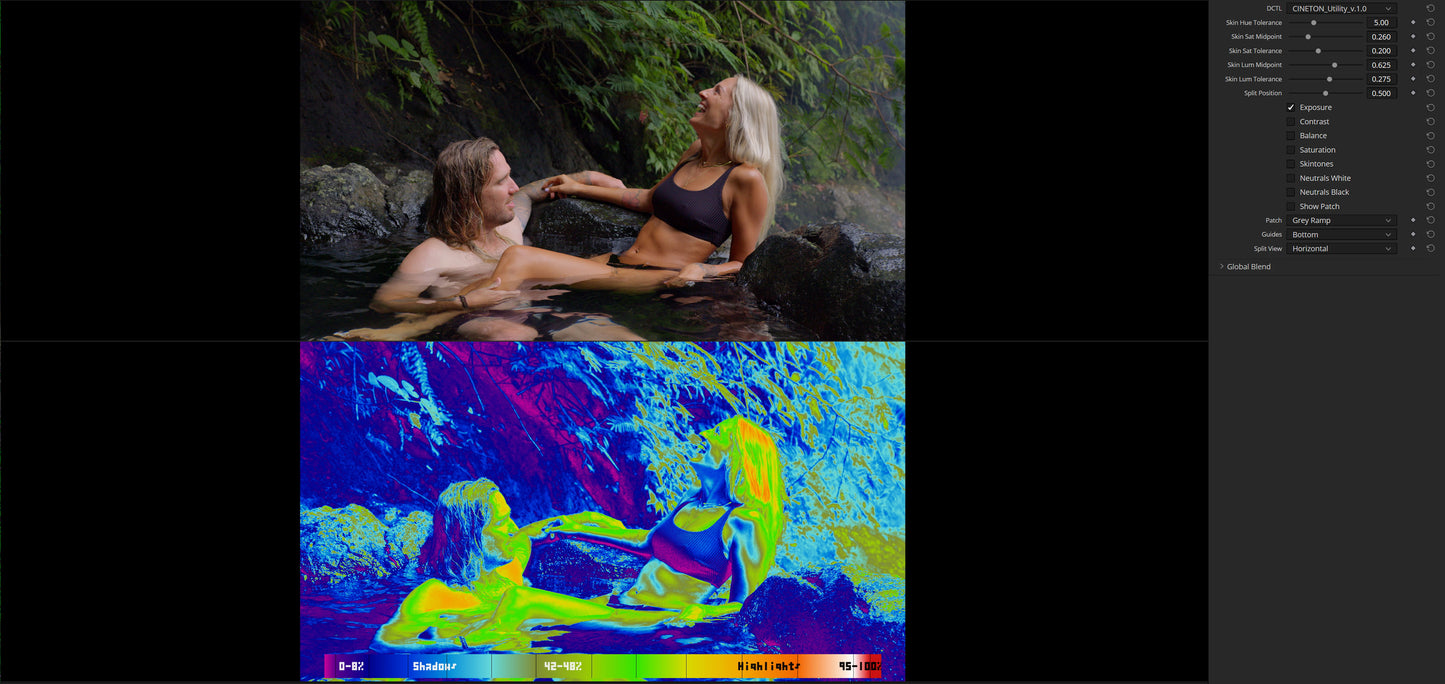
Exposure
14-zone false-color heatmap with smooth color gradients.
Instantly identify underexposed shadows, clipped highlights, and all values in between .
Includes a labeled color legend with zone markings .
Contrast (Contrast)
A clean monochrome view to assess tonal range and contrast distribution – without distractions from colors.
Balance (color balance)
Four-quadrant color deviation map.
See at a glance whether your image tends to be too warm, too cool, too green or too magenta – neutral areas are displayed in gray.
Saturation
9-zone false-color heatmap that visualizes the saturation intensity in the image .
A labeled legend from low to clipped saturation helps you to identify oversaturated areas early.
Skin tones
Hue-based isolation of skin tones with adjustable tolerances for hue, saturation, and luminance .
- Detected skin tones are highlighted in yellow.
- Shifts that are too warm are shown in green.
- Shifts that are too cool are shown in magenta.
A color key for orientation is also included.
Neutrals White / Neutrals Black
It highlights almost white and almost black areas that should actually be neutral.
This allows you to detect subtle color casts in shadows and highlights that are often barely visible to the naked eye.
Show Patch
Reference patch overlay in the lower part of the image.
Choose between:
- Middle Grey
- a warm-to-cold color ramp
- a stepped grey ramp
Ideal for quick visual calibration .
🖥️ SPLIT-VIEW COMPARISON
Horizontal Split
Original image and analysis stacked top/bottom , both scaled so that the entire image remains visible.
Vertical Split
Original (left) and analysis (right) side by side in full resolution .
The split-position slider allows you to move horizontally through the image and examine each area in detail.
✨ PROFESSIONAL DETAILS
- Anti-aliasing bitmap font for sharply readable legends at any resolution
- Smooth color gradients without harsh banding artifacts
- Guide legends with labeled zones (position: top / bottom / off)
- Adjustable skin tone detection (hue, saturation and luminance midpoints as well as tolerances)
- Works with any timeline resolution
- Lightweight single-node DCTL with no external dependencies
⚙️ REQUIREMENTS
- DaVinci Resolve Studio with DCTL support
- Color space: Rec.709
📦 WHAT YOU GET
A .dctl file – simply place it in your DaVinci Resolve DCTL folder , add it as an OFX node and grade with greater confidence.
Share